Portable Video to GIF Converter 1.4.5
This post was published 10 years ago. Download links are most likely obsolete. If that's the case, try asking the uploader to re-upload.
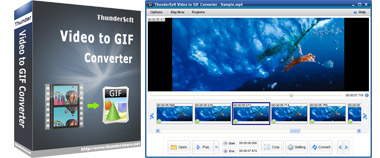
Portable Video to GIF Converter 1.4.5|All Windows(x32/x64) |rar|25.3 mb
ThunderSoft Video to GIF Converter is a handy tool for making animated gif from video files.
Attention!
Dear users! We do not forget about our rights holders!
All portable assembly, designed exclusively for the promotion of the software and can be used for informational purposes only!
After testing the program and decide on the usefulness and necessity of you, this software - you are required! remove the assembly and turn to the developer, to purchase a license for a full version. Good luck!
Preview original video frame by frame, easy crop and specify video clip, convert to gif with high quality. It allows setting gif play speed, replay times and also resizing. The input file supports various popular video formats, such as mp4, avi, mpg, wmv, flv, mov, vob, mkv, rmvb, etc. The software interface is very user-friendly and easy-to-use.
Feature List
Preview original video frame by frame.
Easy crop and specify video clip accurately.
Allow delete unwanted frames.
Allow Change gif play speed, replay times.
Supports almost all popular video formats, such as mp4, avi, mpg, wmv, flv, mov, vob, mkv, rmvb, etc.
Preview output file after conversion.
New
• Video export improvements. SVG improvements. Widget Splash Screens. New Icons and scrollbars. Video export now includes audio.
• Export progress bar. Search the movie. Timers. More scene functions.
• New start page. New editor zoom options. Special character window in text boxes. On resize movie event.
• Remove images from viewer and sequence. New text scaling options. Responsive layout functions. Link set text and font size. HTML set color, Help links, Script timeout.
• Zoom is saved. Ogg support. Export W3C Widgets. Debug text moved. Position loader. Script line numbers.
• Item previews. IE image flicker fixed. Improved Right-To-Left support. Embed individual images. New tabbed interface. Add additional CSS to HTML buttons. Fixed unicode character combinations for languages like Hindi and Arabic.
• Include alternate video formats. iOS 6 improvements. On Over and out improved on mobile. Right to left fonts. Font line height. Properties update. Show errors in HTML export. Nested timelines. Pivot points. Jump between events in script editor. Movie on over and on out events.
Homepage
System Requirements
IBM or compatible Pentium/AMD processor (900 MHz or greater), 512 MB RAM or greater. 1024 x 768, 16-bit display (32-bit recommended)
Windows XP
Windows Vista all SP
Windows 7
Language Multilanguage(Russian English)
Download :Portable (Size:25.3 mb)