SmartGit 7.1 Build 6056 Portable
This post was published 10 years ago. Download links are most likely obsolete. If that's the case, try asking the uploader to re-upload.
SmartGit 7.1 Build 6056 Portable | 65.1 Mb
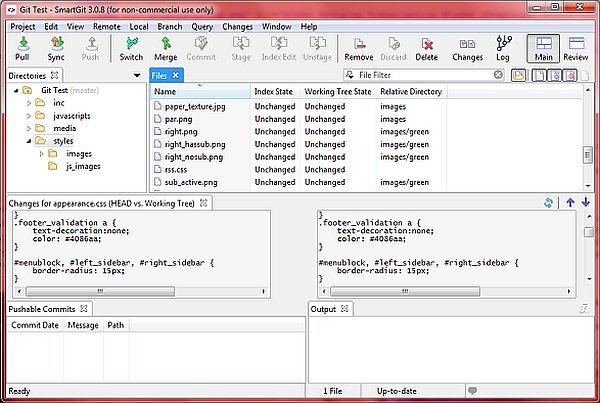
SmartGit/Hg is a powerful tool for the developers who want to manage their source code by using Git or other versioning systems. This client software allows you to access the online repository, make changes and push new commits with minimum effort.
Git is a widely used revision control system that allows programmers to efficiently manage the source code. One of its advantages is the ability to make modifications to a local repository and commit it when you have access to the source code.
This application is designed to provides access to the local repositories and facilitate the connection to the server that stores the project resources. Thus, you can pull content from the server, make modifications and choose the commits you want to push to the server.
The main window allows you to view the project structure and files in order to work with the source code. The program also includes a file comparison tool and the ability to merge files which come in handy when working with multiple versions.
Additional features include the ability to commit a part of a file and view the modifications made by other co-workers. You can also explore your code by launching the Git-Shell and opening it in Windows Explorer or a terminal window.
Although the package does not include a offline help file, you can get accustomed with the Git concepts and available commands by reading the online documentation. Moreover, the app provides step by step instructions for certain operations such as cloning a repository.
Overall, SmartGit/Hg is a valuable tool for programmers who use the Git, Mercurial or Subversion versioning systems. It can also work with multiple hosting providers such as GitHub, Bitbucket or Codebase which makes it easier to integrate in existing projects.
FEATURES
• Virtually all local working tree operations
• Status, diff, log
• Push, pull, fetch (for all protocols)
• Tag and branch management
• Merge, cherry-pick, rebase, revert, rebase
• Stash management
• Remotes management
• Submodule support
• Advanced SVN support (use SmartGit as SVN client)
Note: The application is free for non-commercial use only, without support from the developer's part. For commercial purposes, you must purchase SmartGit after the 30 days trial period is over.
New in version 7.1 Build 6056 Preview 8 (November 30, 2015)
NEW FEATURES, IMPROVEMENTS
Git
• Refresh: support .gitattributes "ident" keyword expansion ("$Id$")
Hg
• Compare: allow to invoke for conflict file
• automatically create the user's smartgit.vmoptions file
• Subscription: allows to register valid, but outdated license fetching latest
• one
Windows
• Installer: option to run SmartGit after installation
Uninstaller
• should ensure SmartGit process is quit before starting to uninstall
• bin\smartgit.vmoption is not created any more allowing complete uninstall
FIXED BUGS
• Resolve dialog: files were not preselected
• External tool: possible assertion showing a directory chooser while window
• has been closed while tool still running
Windows
• Updater fails to launch for subst-ed drives
SYSTEM REQUIREMENTS
• GIT PREVIEW
• JAVA JRE
• Internet connection
OS: Windows 7 / 7 64-bit / 8 / 8 64-bit / 10 / 10 64-bit
Latest stable version - SmartGit 7.0.3 Build 5185