N Button Pro Manager 1.9.3.1314
This post was published 10 years ago. Download links are most likely obsolete. If that's the case, try asking the uploader to re-upload.
Windows Software | N Button Pro Manager 1.9.3.1314 | 17.78 MB
N-Button creates up to 255 widgets that float on your desktop to control external devices, send specified data, run application, send http request or send data list. It supports Serial Port/ USB and Network connection between PC and devices.
N-Button makes it possible to control relay controller boards of National Control Devices without any programming!
N-Button suports up to 255 widgets.
If you need less widgets, you can use N-Button Lite. It only supports up to 8 widgets.
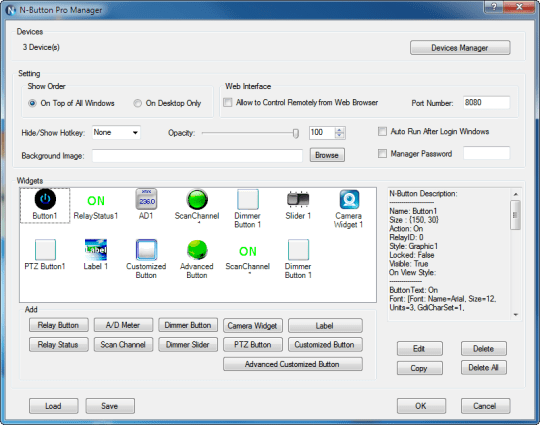
It's very easy to add and modify the widgets by N-Button Manager. There are four types of widgets, Relay Button, Relay Status, A/D Meter and Customized Button.
Relay Button widgets are used to turn on/off relay directly. It is never so easy to control relays before.
It's very easy to create and modify widgets by N-Button Pro Manager
-Relay Button widgets are used to turn relays on/off directly. It was never so easy to control relays!
-Relay Status widgets are used to display status of the relay automatically.
-A/D Meter widgets are used to read and show the value of A/D channel automatically.
-Scan Channel widgets are used to read the contact closure inputs.
-Dimmer Button widgets are used to control brightness of lights.
-Dimmer Slider widgets are used to control brightness of lights with slider.
-Camera Widget shows real-time image from the connected AXIS, Bosch, Mobotix, or Panasonic IP camera.
-PTZ Button widgets control Pan, Tilt and Zoom for AXIS, Bosch, Mobotix, or Panasonic IP camera.
-Label widgets allow you to show static text or image on your desktop.
-Customized Button widgets can be set to send specified command data to any connected devices besides relay boards. It can be set to open a file, a folder or a program, run any application or send http request. It also supports send data list. A group of data can be sent to serial port or IP address just by clicking the created button.
-Advanced Customized Button allows you to control different devices at same time. Several actions can be added and each action can work for different device.
Updates: official site does not provide any info about changes in this version.
Homepage
Homepage
