Enpass Password Manager v5.0.5 Multilingual
This post was published 10 years ago. Download links are most likely obsolete. If that's the case, try asking the uploader to re-upload.
Enpass Password Manager v5.0.5 Multilingual | 31.4 Mb
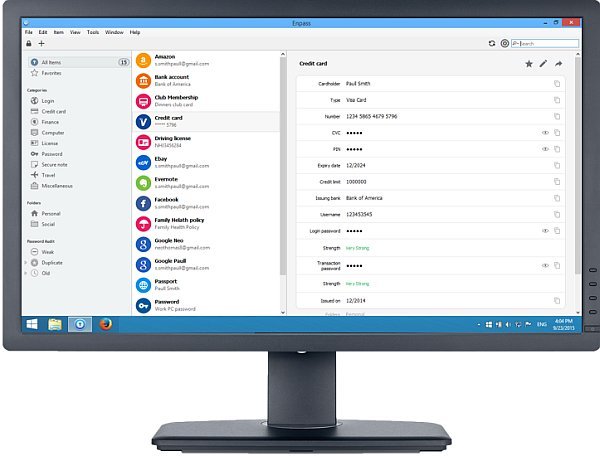
A lot of users prefer online shopping to the traditional one, as well as making financial transactions right from their PC, instead of visiting a bank whenever they want to manage the contents of their account. Enpass is one of the numerous applications that you can rely on to keep all your online credentials stored in a single place, safely protected by the password you select.
Import credentials from other accounts
When running Enpass for the first time, you get the possibility to choose whether you want to create new local records or if you prefer to simply restore data from your Dropbox or OneDrive accounts.
Additionally, you can also import information from other famous password managers, such as Handy Safe, KeePass, LastPass, Password Safe, DataVault, RoboForm, SplashID or SPB Wallet.
It should also be mentioned that you can import data from several supported Mac applications, such as RoboForm, KeePassX, eWallet, mSecure, Moxier Wallet or SafeWallet.
Another strong point of Enpass is that its clients can be run on all major mobile platforms, namely iOS, Windows Phone, Android and Blackberry.
On the downside, the only way to export your data is to TXT, meaning that all the info is left completely unprotected, so you should use this function as rarely as possible.
Store passwords for a wide range of accounts
If you choose to create new records that will be stored locally, you need to first select a master password, then choose the type of entry you want to add (credit card, finance, software licenses, online logins, passwords, secure notes or travel info).
Depending on the type of record you are interested in, Enpass provides you with multiple templates that you can choose from, all meant to simplify the entire process as much as possible.
Generate strong passwords and automatically clear clipboard
Regardless of the type of entry you want to set up, Enpass offers you the possibility to either enter your own custom passkey or generate a brand new one. You get to specify the password’s length, as well as the type of characters that should be used (symbols, uppercase or lowercase letters).
Moreover, you can set Enpass to be automatically locked after a specified time interval, as well as clear all the data stored in the clipboard after as little as 30 seconds.
All in all, Enpass is a straightforward utility that is bound to be appreciated by those who like to have all their online info at hand, especially since they can import credentials from numerous third-party services.
FEATURES
• Auto-fill with Enpass Browser Extension
• Stores Everything
• Strong Password Generator
• Synchronize Encrypted Data
• Password Audit
New in version 5.0.5 (February 25, 2016)
• Fixed an error 403 in Enpass extension while communicating with new Opera 35: Recently Opera has changed its signing certificate in ver 35, due to which Enpass fails to verify the code signature and throws error 403.
• Minor bug fixed.
OS: Windows XP SP3 / Vista / 7 / 8 / Server 2012 / 10 (32/64-bit)