Double Commander 0.6.6 beta (x86/x64) + Portable
This post was published 10 years ago. Download links are most likely obsolete. If that's the case, try asking the uploader to re-upload.
Double Commander 0.6.6 beta (x86/x64) + Portable | 32.4/33.7 Mb
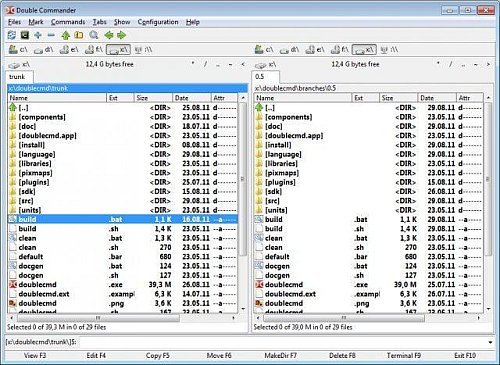
Double Commander is a straightforward and effective software solution that helps you to browse your personal files and folders in a more efficient way. The main window of the application is separated by two panels side by side that allow you to view the content of two different partitions and browse through folders with ease. For each file, image or folder, details such as name, extension, size, date and attributes are displayed in the list.
One important function of Double Commander is that it allows you to pack files to ZIP, LZMA, TAR, BZ2, TBZ, GZ and TGZ archives by selecting the compression method you are interested in. Also, you are able to create symbolic links, change the timestamp properties and the attributes, view file properties and calculate the occupied space by a specific file.
What’s more, the program enables you to compare two files by their content, change the encoding format for each one and view all the identified differences. This feature is very useful for users who need to compare two documents with identical content, but still contain few different words or sentences.
The Search function enables you to find your favorite files by size, included text, created date and file mask. This way, you can search a directory for specific documents effortlessly. Additionally, you can sort them by name, date, attributes or size. By accessing the Commands menu you are able to swap the panels as well.
However, a drawback of Double Commander is that it does not allow you to move files from one partition to another using drag and drop. All you can do is to browse two different partitions and view their content, delete and rename folders and files, or simply pin them to Start.
In closing, Double Commander comes in handy for users who need to browse through their computer and view the content of two different partitions simultaneously.
Here are some key features of Double Commander
• Unicode support
• All operations working in background
• Multi-rename tool
• Tabbed interface
• Custom columns
• Internal text editor (F4) with syntax hightlighting
• Built in file viewer (F3) to view files of in hex, binary or text format
• Archives are handled like subdirectories. You can easily copy files to and from archives. Supported archive types: ZIP, TAR GZ, TGZ, LZMA and also BZ2, RPM, CPIO, DEB, RAR.
• Extended search function with full text search in any files
• Configurable button bar to start external programs or internal menu commands
• Total Commander WCX, WDX and WLX plug-ins support
• File operations logging
• And more...
[b
Change Log Double Commander 0.6.6 (Released 2015-10-11)[/b]]- Japanese Translation (Alexx2000) - resolved.
- Infinite thumbnails creation when switching to thumbnails view at %LOCALAPPDATA%\doublecmd\thumbnails - resolved.
- CRC-file not found due to case sensitivity error - resolved.
- 'Test Archive', don't show an error message - resolved.
- Archiv Test raises error (wrong extension) - resolved.
- sevenzip configure don't work as expected - resolved.
- user interface] Directory color highlight - resolved.
- no refresh the file/directory-list - resolved.
- 'overwrite all' user interaction dialog keep requesting permission (sync folder) - resolved.
- Panel of operations doesn't signal messages (questions) to the user - resolved.
- Time not displayed in datetime column - resolved.
- No feedback about missing access right - resolved.
- Column width settings are not preserved when restarted - resolved.
OS: Windows XP / XP 64-bit / Vista / Vista 64-bit / 7 / 7 64-bit / 8 / 8 64-bit
Languages (24): English, German, French, Polish, Portuguese, Spanish, Italian, Russian, Dutch, Ukrainian, Romania, Chinese...